 Moiz Mustafa
Reply To:
Name - Reply Comment
By Moiz Mustafa
Colombo, March 22 (Daily Mirror) - Sri Lanka has implemented a QR Code-based National Fuel Authorization System for fuel distribution across the country, requiring vehicle owners to obtain a registered QR code before purchasing fuel from filling stations.
Under this system, fuel will not be issued from any filling station without a valid QR code linked to a registered vehicle.
The system is designed to manage fuel distribution during ongoing supply pressures and ensure that available fuel is allocated fairly among vehicle owners.
This guide explains why the system was introduced, how to get your QR code, and the weekly fuel quota for each vehicle category.
The Ministry of Energy says the system was introduced following global fuel supply disruptions linked to the ongoing military situation in the Middle East.
Authorities say these disruptions have affected international petroleum supply routes while domestic demand for fuel in Sri Lanka has increased significantly, placing pressure on national fuel reserves.
Officials have also identified illegal fuel hoarding and stockpiling, which has contributed to supply shortages in certain areas.
The QR code system aims to:
• Ensure fair fuel distribution
• Prevent hoarding and illegal fuel rackets
• Protect national fuel reserves
• Maintain economic activity and transport services
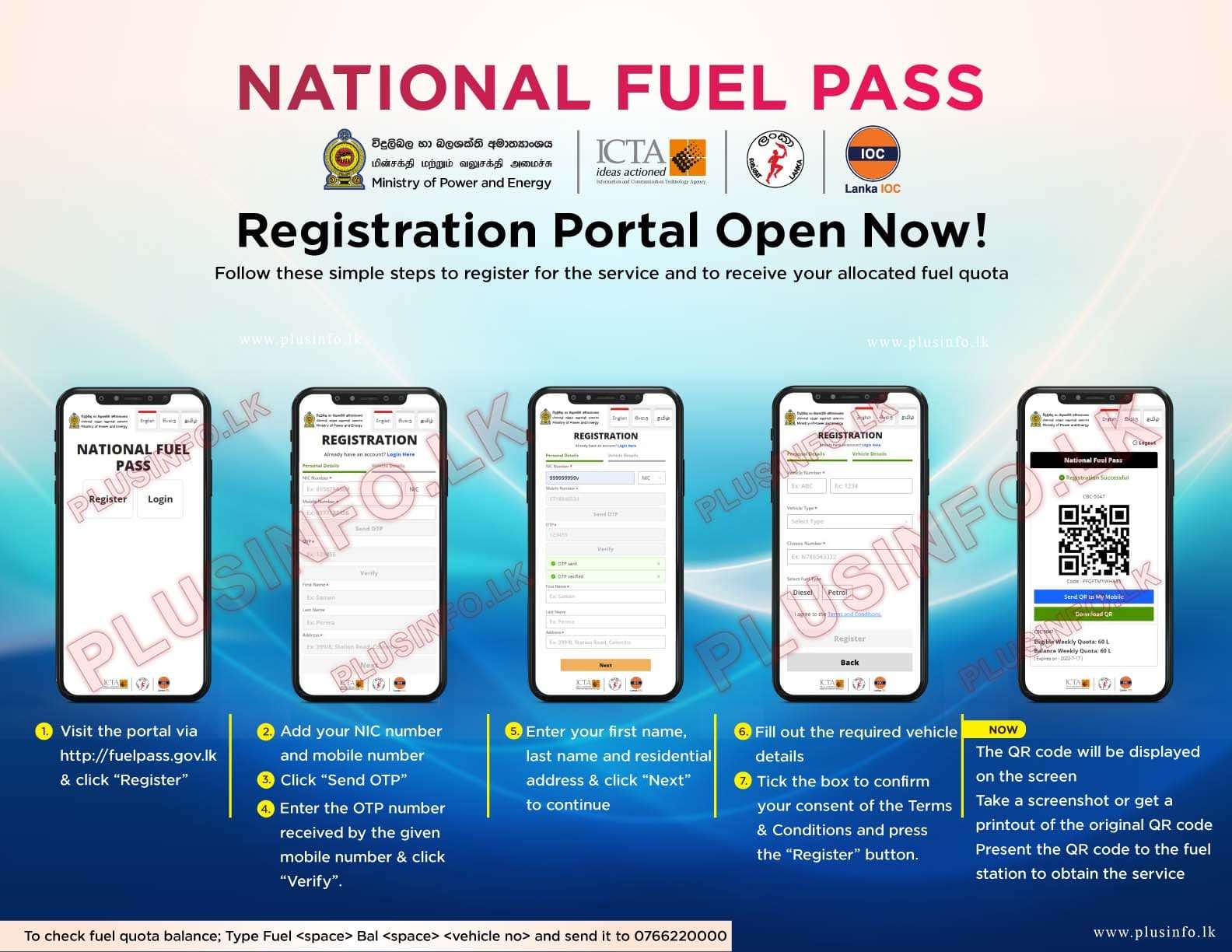
Vehicle owners must register or download their QR code through the official website:
Visit fuelpass.gov.lk
Click Vehicle Login
Download your QR code
Visit fuelpass.gov.lk
Select Vehicle Registration
Update your details and complete the registration process
This includes:
Vehicles that never registered for FuelPass
Newly registered vehicles with the Department of Motor Traffic
Steps:
Visit fuelpass.gov.lk
Click Vehicle Registration
Enter vehicle and owner details
Complete registration
Download your QR code
If you previously registered but lost or accidentally deleted your QR code, you do not need to register again as long as your vehicle details and phone number remain unchanged.
You can simply:
Log into the system at fuelpass.gov.lk
Request a One-Time Password (OTP) sent to your registered mobile number
Retrieve and download your QR code
A new registration is required if:
You have not registered previously
You recently purchased a new vehicle
You no longer use the phone number linked to your previous registration
Registration can be completed through fuelpass.gov.lk by selecting Vehicle Registration.
For further assistance or information about the FuelPass system, the public can contact the Government Information Center hotline: 1919.
Authorities have requested vehicle owners to follow these guidelines carefully to minimize queues at fuel stations and ensure efficient service nationwide.
Fuel stations across Sri Lanka are operating under a mandatory QR code verification system.
Fuel will not be issued without a valid QR code linked to a registered vehicle.
Vehicle owners must present their QR code — either on a mobile device or as a printed copy — when purchasing fuel.
Fuel will also be issued based on the last digit of vehicle number plates, alongside the QR code system.
The Ceylon Petroleum Corporation (CPC) said the schedule will be implemented to manage demand and reduce congestion at filling stations.
According to CPC Managing Director Mayura Netthikumara:
• Vehicles with number plates ending in 0, 2, 4, 6, and 8 can obtain fuel on even-numbered days
• Vehicles with number plates ending in 1, 3, 5, 7, and 9 can obtain fuel on odd-numbered days
This measure comes as authorities continue to manage fuel distribution amid ongoing supply pressures.
The government has revised weekly fuel limits based on vehicle categories.
The revised quotas are as follows:
• Cars: 25 litres (an increase of 10 litres)
• Three-wheelers: 20 litres (an increase of 5 litres)
• Motorcycles: 8 litres (an increase of 3 litres)
• Buses: 100 litres (an increase of 40 litres)
• Vans: 50 litres (an increase of 10 litres)
• Land vehicles: 40 litres (an increase of 15 litres)
• Quadricycle: 8 litres (an increase of 3 litres)
Meanwhile, there will be no change in the fuel quotas allocated for lorries and special-purpose vehicles.
Special fuel distribution arrangements will be implemented to ensure essential sectors and production activities are not disrupted.
This includes:
Public transport services
Agriculture
Production and supply chains
Fuel for private passenger buses will be issued through the Sri Lanka Transport Board (SLTB).
Further decisions regarding essential sectors are expected to be announced by authorities.
Authorities say they are currently addressing issues faced by:
Vehicle owners who changed ownership
Users who changed their registered phone number
People who recently purchased new vehicles
Officials say necessary solutions will be implemented as quickly as possible.
A new feature has been introduced to resolve issues faced by users attempting to access QR codes for previously registered vehicles.
The system now allows vehicle owners to:
• Enter the vehicle number and chassis number to verify ownership
• Cancel existing registrations linked to another phone number
• Re-register the vehicle under a new mobile number
When the “Override” option is used, the previous registration is removed and a new account is activated immediately.
Authorities say this feature will help users who purchased vehicles or changed phone numbers to obtain QR codes without delays.
Authorities have introduced dedicated support services to assist users facing registration and technical issues with the National Fuel Pass system.
Vehicle owners can now obtain assistance by messaging via WhatsApp:
• 076 000 1919 (GIC support)
• 076 019 1919 (technical support & complaints)
Users must send their vehicle number as text and may be required to submit documents including NIC/passport, vehicle licence, and CR.
The service also allows users to report technical issues and suspected misuse of the system.
1. What is the Fuel QR Code System?
The Fuel QR Code System requires vehicle owners to register their vehicles and obtain a QR code before purchasing fuel from filling stations.
2. Do I need a QR code to buy fuel?
Yes. Fuel stations will not issue fuel without a valid QR code linked to a registered vehicle.
3. Why was the system introduced?
The system was introduced to manage limited fuel supplies, prevent hoarding, and ensure fair fuel distribution across the country.
4. Where can I register for the Fuel QR code?
Vehicle owners can register online through the official website: https://fuelpass.gov.lk
5. Can I continue using my existing QR code if my vehicle and mobile number have not changed?
Yes. Existing QR codes remain valid. Vehicle owners can log in to the FuelPass website using their registered mobile number to access their QR code.
6. How do I register a newly purchased vehicle?
Vehicle owners must register the vehicle through the FuelPass website by selecting Vehicle Registration and entering the required vehicle and owner details.
7. I purchased a vehicle that already has a QR code from the previous owner. What should I do?
You must register the vehicle again under your ownership through the FuelPass website in order to obtain a new QR code.
8. What should I do if I sold my vehicle to another person?
The previous owner must log into the FuelPass website using their registered mobile number and select the “Delete Profile” option to remove the vehicle from their account.
This allows the new owner to register the vehicle and obtain a new QR code.
9. What if my registered mobile number is no longer active?
If your mobile number has changed or is no longer active, you must re-register your vehicle on the FuelPass website to obtain a new QR code.
10. What should I do if I lost or deleted my QR code?
You can log in to fuelpass.gov.lk using your registered mobile number and retrieve the QR code using a One-Time Password (OTP).
11. Can I show the QR code from my phone at a fuel station?
Yes. The QR code can be presented on a mobile device or as a printed copy when purchasing fuel.
12. What happens if my weekly fuel quota is finished?
Once the weekly quota is used, the vehicle owner must wait until the next allocation period before purchasing additional fuel.
13. What is the weekly fuel quota for vehicles?
• Cars: 25 litres
• Three-wheelers: 20 litres
• Motorcycles: 8 litres
• Buses: 100 litres
• Vans: 50 litres
• Land vehicles: 40 litres
• Quadricycle: 8 litres
14. Can one QR code be used for multiple vehicles?
No. Each vehicle must have its own registered QR code.
15. What should I do if I receive an error saying “Vehicle Already Registered”?
This may occur if the vehicle was previously registered. Owners are advised to try registering again or ensure the previous registration has been removed.
16. What should I do if I receive an error stating the chassis number is incorrect?
Vehicle owners must contact the Department of Motor Traffic (DMT) to correct the vehicle registration details.
17. Can I register vehicles under 50cc for a fuel QR code?
Fuel QR codes are issued only for vehicles registered with the Department of Motor Traffic (DMT).
18. Can I register multiple vehicles under the same NIC?
Currently, only one vehicle can be registered per NIC and mobile number in the FuelPass system. Additional vehicles must be registered using a different NIC and mobile number.
19. Can QR codes be issued for fuel used for generators or other non-vehicle purposes?
At present, the FuelPass system applies only to registered vehicles. Any provisions for non-vehicle fuel usage will depend on future government decisions.
20. What should I do if the FuelPass website is not working?
If the website experiences temporary technical issues, users are advised to wait a few minutes and try accessing the website again.
21. What if my OTP arrives after it has expired?
If the OTP expires before use, you can request a new OTP by clicking the “Resend OTP” option.
22. Who can I contact for help with the FuelPass system?
For assistance, the public can contact the Government Information Center hotline at 1919 or a WhatsApp service has been introduced to assist with FuelPass registration.
- 076 000 1919 (GIC support)
- 076 019 1919 (technical support & complaints)